Subscribed calendar with no alerts on iPhone: the cause and the fix
5 October 2026
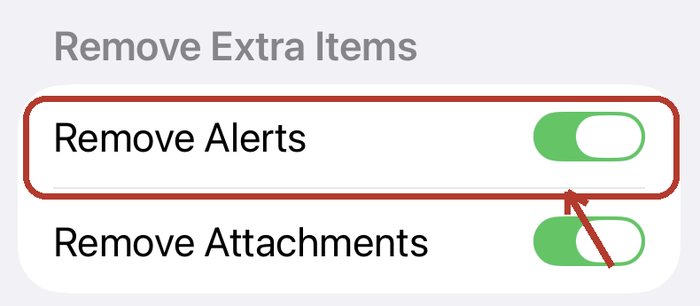
You subscribed to a calendar. The events are there, but the phone stays silent when they start. In our testing the cause was almost always the same: a switch called Remove Alerts, which is on by default and sits one screen deeper than most people look.
The fix
- Delete the subscribed calendar from the Calendar app. Your own calendars are not affected.
- Open the subscription link again.
- When Apple's subscribe screen appears, do not confirm yet. Scroll to the bottom and tap Subscription Details.
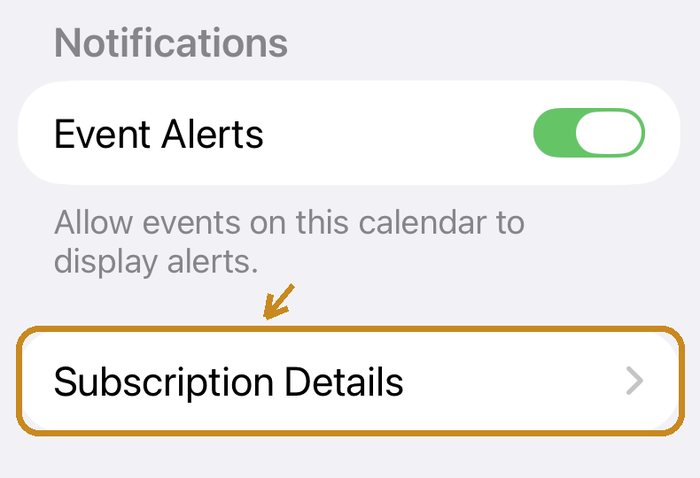
- Turn Remove Alerts off, go back, and then confirm.
Why it happens
A calendar feed can carry alerts along with its events. When you subscribe, the iPhone offers to strip them out, and that option is switched on unless you change it. The events still arrive, so everything looks right. Apple's guide for Calendar on the Mac describes the same setting: to receive a calendar's alerts, you untick the matching Remove option (Apple Support).
What we found when we tested it
We tested this on an iPhone running iOS 26 in September 2026, because our own product depends on it.
- Remove Alerts was on by default.
- The switch is not on the first subscribe screen. It is under Subscription Details, at the bottom.
- With Remove Alerts off, alerts fired reliably and on time.
- Turning it off after subscribing did not bring the alerts back in our test. Deleting the calendar and subscribing again did.
- The phone fetched the feed roughly every five to six minutes.
- iCloud synced the subscription to the other devices on the same Apple account.
Apple can change any of this in an update. If you see something different, tell us and we will correct this page.
If it still does not alert
- The calendar may not contain any alerts. Many published calendars carry events only. Then there is nothing for the phone to show, whatever the switch says. Ask whoever publishes it.
- Check notifications for the Calendar app in Settings, and whether a Focus mode is silencing them.
Google Calendar is different
In our testing, Google Calendar showed the events from a subscribed feed but ignored the alerts inside it. Updates there can also take many hours, and you cannot force a refresh. Notifications come from Google Calendar's own settings for that calendar, not from the feed.
If you are the one sending the calendar
The person at the other end does not know any of this, and nothing on their screen tells them it failed. Three things help:
- Make sure your feed actually includes alerts.
- Tell people about Remove Alerts before they tap subscribe, with a picture.
- Send one test event soon afterwards, so they find out today and not on the day it matters.
Turnabee does these for you. Its setup page shows the step with screenshots right above the button, and it sends a test reminder that the person can confirm. For Google Calendar it writes events, with reminders, directly into the person's calendar and does not rely on a feed. Try the receiving side, or read how to send a schedule to someone who will not install an app.
More guides
Questions or ideas? Contact us →