Help
This page is for people who received an invite link: how to get the things someone scheduled for you into the calendar you already use.
You do not need an account, a password, or an app. Set it up once and anything they add or change shows up in your calendar on its own. You never have to open this site again.
You will get a link
By message, email, or a QR code to scan. Open it, pick the calendar you already use, and that is the whole setup.
That link is yours specifically — do not forward it. Whoever has it is treated as you.
Apple Calendar (iPhone, iPad, Mac)
One step matters a lot. Skip it and the events will appear, but they will never alert you — and you will not notice, because everything looks fine.
- Apple's subscribe screen appears. Do not tap the tick in the corner yet.
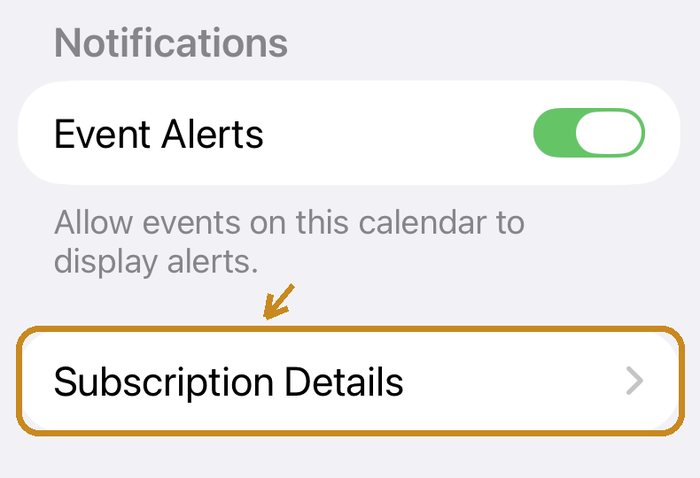
- Scroll to the bottom and tap Subscription Details.
- Turn Remove Alerts off, go back, and then tap the tick.
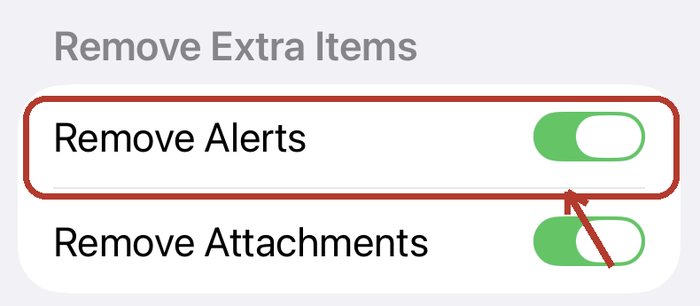
Remove Alerts is on by default, and it strips out every reminder we set. Turning it off is the single most important line on this page.
Already added it, but no reminders?
That step is almost always why. The simplest fix: delete that calendar from your Calendar app and open the original link again, this time turning Remove Alerts off. Your own calendars are untouched — you are only deleting the subscribed one.
Google Calendar
Tap Connect Google Calendar and approve once with your Google account.
On Google's consent screen there is a small checkbox next to the permission, and it is not ticked by default. Tick it — without it we cannot write to your calendar, and nothing on screen tells you what is missing.
Connect once. After that it updates by itself.
Any other calendar app
Open your link on a computer or an Android phone and you will find a URL ending in
.ics near the bottom. Copy it into your calendar app's
"subscribe to calendar" or "add calendar from URL".
We do not recommend Outlook right now. We tested it: Outlook reads the times as a different time zone, so events show up hours away from what was actually scheduled. Until we sort that out, Outlook will show you the wrong time.
Why is it sometimes not up to date?
A subscribed calendar is fetched by your calendar app on its own schedule — we do not push it. How often is up to that app, usually every few hours, and we cannot change it.
So a change made just now may take a while to reach you. (Google Calendar is faster, because there we write to your calendar directly.)
Stopping it
You can stop at any time, without telling anyone or asking permission:
- Subscribed calendar: delete that calendar from your calendar app.
- Connected with Google: remove Turnabee under your Google Account's third-party connections.
- Emails: every email has an unsubscribe link at the bottom.
Once you stop, the other person cannot switch it back on for you. They can only send you the link again.
Adding Turnabee to your home screen
If you also want to look at the board itself (not required), you can add it to your home screen and use it like an app. How →
Still stuck?
Email hello@turnabee.com and tell us which phone and which calendar you use. We will reply.